 Ed
Ed 
This post contains Amazon affiliate links. We may earn a small commission at no extra cost to you. Full disclosure.
Every Realtor I know has a story about a porch pirate, a vandalized listing sign, or a buyer who walked because a house felt unsafe at the curb. After 19 years selling homes in Austin and the surrounding Hill Country, I have come to believe that a good security camera setup is one of the highest-ROI upgrades a homeowner can make, whether you are getting ready to list, just moved into a new place, or planning to stay put for the next decade.
I install cameras at every active listing I represent now. Sellers love the peace of mind during showings. Buyers like seeing them at move-in. And insurance companies in Texas often discount premiums for homes with monitored systems. The technology has gotten dramatically better and cheaper in the last two years, and the buying decision is no longer about whether to get a camera but about which one fits your house, your habits, and your budget.
This guide is built around what I actually recommend to my clients in the Austin market in 2026. I have grouped picks by use case rather than ranked them one through seven, because the right camera for a renter in a 1990s condo on Far West is different from the right system for a five-bedroom on a one-acre lot in Dripping Springs. Lets walk through them.
Quick Comparison: My 7 Picks for Austin Homeowners
| Best For | Product | Setup | Price Tier |
|---|---|---|---|
| Best Overall Wireless | REOLINK RLC-823S2 4K PTZ Smart Camera | Wired or PoE, 16x optical zoom | $$ |
| Best Whole-Home System | REOLINK 16-Channel 4K PoE NVR (8 cameras) | Wired, professional-grade | $$$$ |
| Best Premium Wireless | Arlo Ultra 4K HDR 3rd Gen (4-cam + solar) | Battery with solar panels, SmartHub | $$$$ |
| Best Smart Home Integration | Google Nest Cam (Battery, Outdoor or Indoor) | Battery, indoor or outdoor | $$ |
| Best Floodlight Combo | Ring Floodlight Cam Pro (4K, 2000 lumens) | Hardwired, replaces existing fixture | $$$ |
| Best Doorbell Cam | Google Nest Doorbell (Wired, 3rd Gen) | Hardwired to existing doorbell | $$ |
| Best for Renters / No Drilling | Blink Outdoor 4 (5-camera system) | Battery, mounts without screws | $ |
1. Best Overall: REOLINK RLC-823S2 4K PTZ Smart Camera
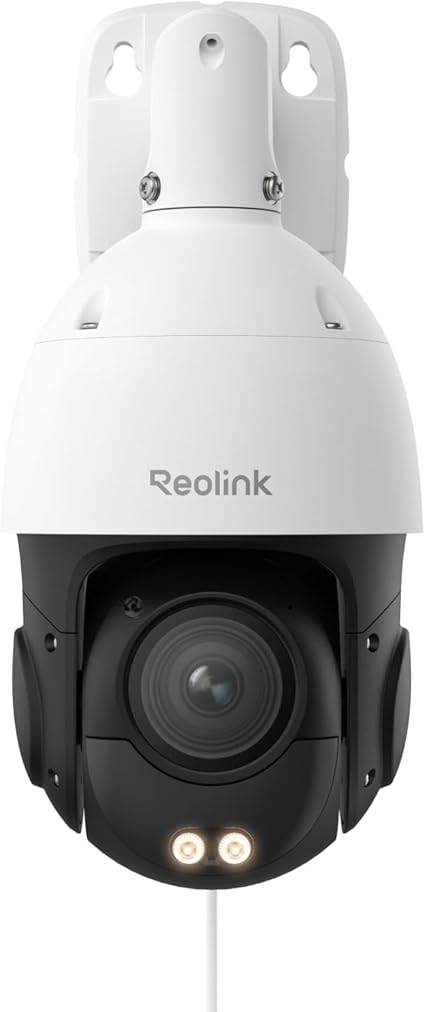 If you want one camera that does almost everything well without a constellation of devices around your property, this is where I start. REOLINK has quietly become my favorite brand for clients who want professional features without a subscription requirement. The RLC-823S2 is a pan-tilt-zoom camera with 16x optical zoom, 4K resolution that actually looks like 4K when you pull footage, built-in spotlights that double as a deterrent, color night vision that works, and person, vehicle, and animal detection baked in. It is a genuinely professional-grade camera at a consumer price.
The thing I appreciate most: REOLINK lets you record locally to a microSD card or a network recorder. You are not forced into a cloud subscription to watch your own video. For Austin homeowners who do not want a recurring fee on top of everything else, this matters.
Pros: No monthly subscription required, true 4K with 16x zoom, built-in spotlights deter intruders, PTZ for remote aiming, excellent color night vision.
Cons: App is not as polished as Ring or Nest, no Apple HomeKit support, requires a wired power connection (PoE works if you have network cable).
Austin tip: Mount it under an eave, not in direct afternoon sun. Texas summer heat affects every electronic housing, and a shaded mount will add years of useful life.
2. Best Whole-Home System: REOLINK 16-Channel 4K PoE NVR (8 Cameras)
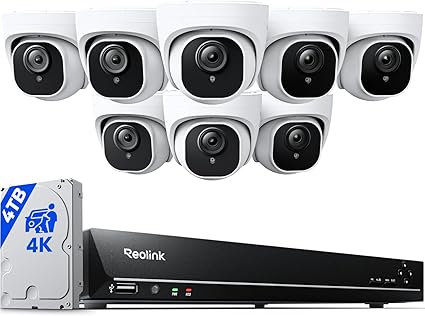 This is the system I recommend for clients with larger lots, multiple buildings (detached garages, casitas, barns, or pool houses), or anyone who wants a real surveillance setup rather than a few cameras stuck around the doors. For the price of two or three nice individual cameras you get an eight-camera kit with a network video recorder that handles storage, power, and management in one box. The bundled 4TB drive records 24/7 for weeks before overwriting.
PoE (Power over Ethernet) means each camera runs on a single Cat6 cable that delivers both power and data. No batteries to swap, no Wi-Fi dropouts, no cloud dependency. For a custom Austin home where you have control over wiring during construction or remodel, this is the right way to do it. Expandable to 16 cameras total if you outgrow eight.
Pros: 4K across all eight cameras, no subscription, professional-grade reliability, expandable to 16 cameras, includes NVR with 4TB HDD.
Cons: Installation is a project, not a weekend afternoon. Best done during a remodel or new build. Professional mounting recommended.
Austin tip: If you are building or remodeling, ask your builder to pull Cat6 to every soffit corner during framing. Costs almost nothing then. Costs a fortune to retrofit.
3. Best Premium Wireless: Arlo Ultra 4K HDR 3rd Gen (4-Cam + Solar Bundle)
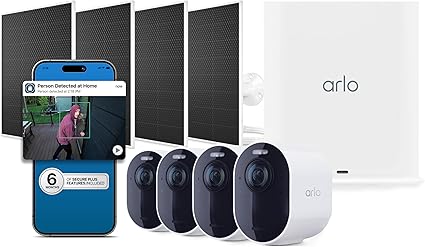 Arlo is what I recommend when a client wants the polished experience: best-in-class app, the cleanest video review interface, and integration with both Apple and Google ecosystems. The newest release pairs four 4K cameras with Arlo’s SmartHub for local recording, includes four matching solar panels (so you never charge a battery again), and bundles six months of the Secure Plus subscription for AI-powered detection of people, vehicles, packages, and animals.
For households who already live in HomeKit or who want to share access cleanly between spouses, kids, and a property manager, Arlo’s user management is the best in the business. It is more expensive than REOLINK and does push you toward a subscription for advanced features past the six-month trial, but the experience is genuinely more refined.
Pros: Premium app, works with Apple HomeKit and Google Home, solar panels eliminate battery charging, 180° field of view, 4K HDR video, SmartHub adds local recording.
Cons: Expensive, advanced features require Arlo Secure subscription after trial, batteries drain faster without solar panels in heavy-traffic spots.
Austin tip: Solar panels work well in Austin’s climate. Full sun four hours a day is plenty to keep these topped off year-round.
4. Best Smart Home Integration: Google Nest Cam (Battery, Outdoor or Indoor)
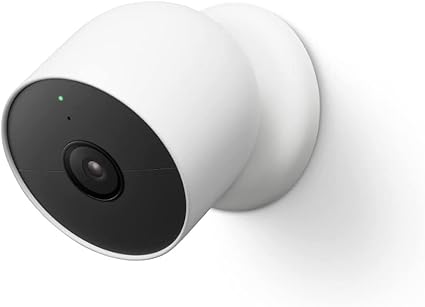 For anyone already running a Google Home or Nest ecosystem, this is the no-brainer. Same app you use for the thermostat, same notifications stack, same voice assistant. The battery model is the genuinely flexible one, because you can use it indoors today, throw it on the back patio next month, then mount it on the front of a garage when you decide that is where you really need it.
Nest’s intelligence is the differentiator. The camera tells you whether it saw a person, a package, an animal, or a vehicle, and it does it accurately. On a normal day in my own neighborhood, I get exactly the alerts I care about and almost no false positives. After a summer evening in Austin where every porch camera in the city seems to ping every time a moth flies by, that filtering is worth something.
Pros: Same camera works indoor or outdoor, excellent person/package/animal detection, integrates seamlessly with Google Home and Nest thermostats, sharp 1080p HDR video.
Cons: Most useful features require Nest Aware subscription, no Apple HomeKit support, battery life takes a hit in busy locations.
Austin tip: Pair this with a Nest Doorbell (next pick) and package detection will alert you the second FedEx leaves something, which is half the reason most of my clients buy a camera in the first place.
5. Best Floodlight Combo: Ring Floodlight Cam Pro (4K, 2000 Lumens)
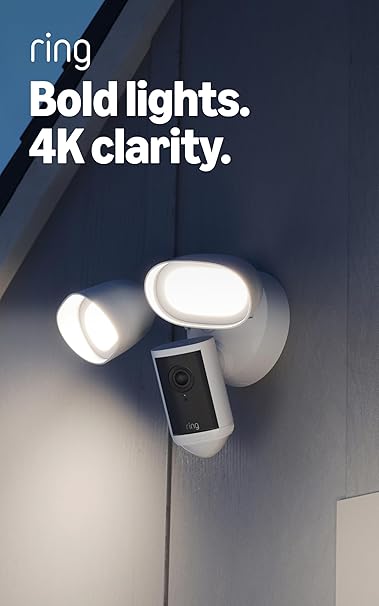 If you have an existing exterior floodlight (most Austin homes have at least one over the driveway and one over the back patio), this replaces it. The newest Ring Floodlight Cam Pro is a step up from the older Wired Plus model: Retinal 4K video, 10x enhanced zoom, and two 2000-lumen floodlights that are genuinely bright enough to light up an entire back yard. You get hardwired power that never dies, sharp wide-angle recording, and two-way audio for talking to delivery drivers or scaring off anyone poking around.
Ring is owned by Amazon, which means the integration with Echo Show devices and the broader Amazon ecosystem is excellent. It also means you should be aware that some features assume you are okay with Amazon’s data practices. That is a personal call worth making consciously.
Pros: 4K video with 10x zoom, extremely bright 2000-lumen floodlights, hardwired so it never needs charging, two-way audio, works with Alexa and Echo Show.
Cons: Requires hardwiring (replace existing floodlight or call an electrician), best features need Ring Protect subscription.
Austin tip: The floodlights alone are bright enough to double as patio lighting. At a listing with a detached garage or rear pool equipment, this kills two birds: security coverage and yard illumination.
6. Best Doorbell Cam: Google Nest Doorbell (Wired, 3rd Generation)
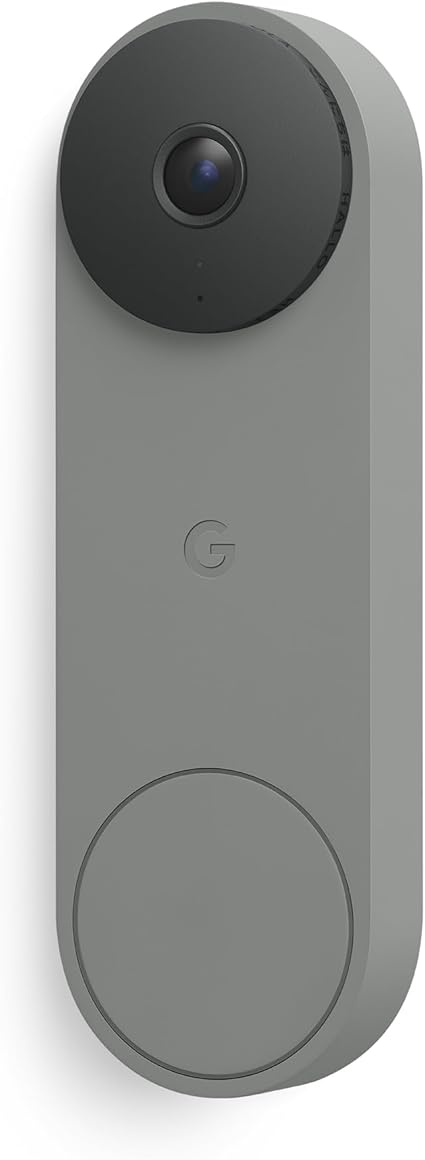 Of all the cameras you might buy, the doorbell is the one that pays for itself fastest. It captures package deliveries, solicitors, contractor arrivals, kids coming home from school, and the occasional uninvited visitor. The 3rd Gen Nest Doorbell is wired (I prefer this for permanence, no batteries to swap), records 2K video, and now includes Gemini-powered intelligence for smarter notifications.
The video is sharp enough that you can read a license plate at the curb in good light. Two-way audio is clear in both directions. And because it is Nest, it talks to the rest of your Google smart home (lights, locks, thermostats) so you can build automations like “when someone rings the doorbell, turn on the entry light.”
Pros: Wired so always on, sharp 2K video with HDR, Gemini AI for smarter alerts, accurate person and package detection, integrates with Google Home automations, clean modern look.
Cons: Requires existing doorbell wiring (most Austin homes have it), full features require Nest Aware subscription, no Apple HomeKit support.
Austin tip: If you are listing a home, leave the doorbell cam installed but disable recording during showings. Buyers find it intrusive when they walk up and realize they are being recorded. Texas is a one-party consent state for audio, but avoiding the awkwardness entirely is the smart play.
7. Best for Renters / No Drilling: Blink Outdoor 4 (5-Camera System)
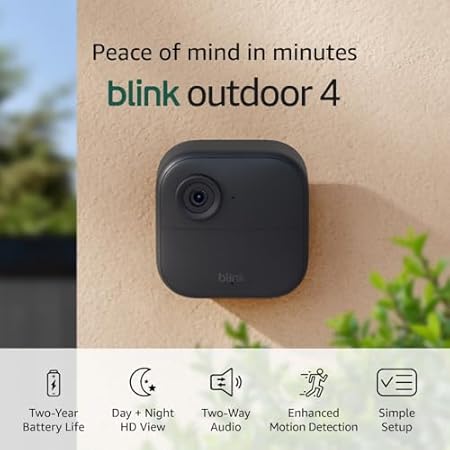 For the Austin renter, the new homeowner who is not ready to drill into stucco, or the investor who wants an effective setup at a short-term rental, Blink is the answer. This five-camera bundle covers an entire property, two AA lithium batteries in each unit last up to two years in normal use, and the mounts can attach with 3M-style adhesive. Total cost is a fraction of any single premium camera above.
Blink is Amazon-owned, so it shares the Ring ecosystem benefits and limitations. Video quality is 1080p (solid but not exceptional), motion detection is good but not Nest-level. What you are really paying for is dead-simple installation, long battery life, and a genuinely useful multi-camera system at an entry-level price.
Pros: Two-year battery life on AA cells, no drilling required, five cameras in one bundle, integrates with Alexa and Echo Show, lowest cost per camera on this list.
Cons: 1080p instead of 2K/4K, full features require Blink Subscription, battery degrades faster in extreme heat.
Austin tip: Excellent choice for a rental or short-term rental property where you do not want permanent installs. Disclose to guests in your house manual that the property has exterior cameras (required by Airbnb policy and Texas best practice).
What to Look For (Especially If You Live in Texas)
I have learned the hard way that not every camera handles Austin well. A few things to check before you buy:
Heat Tolerance
Texas summers regularly hit 105°F in the shade. Many consumer cameras spec their operating range at 104°F maximum. Read the fine print before mounting anything in direct afternoon sun. The picks above are all rated for higher temperatures, but verify before you mount on a south- or west-facing wall.
Weather Resistance Rating
Look for IP65 minimum for any outdoor camera. IP67 is better. This rating tells you how well the camera resists dust and water. Austin gets sideways thunderstorms several times a year. A poorly sealed camera will short out within a season. Six of the seven picks above are IP65 or better; the Google Nest Cam (Battery) is rated IP54, which still resists dust, rain, and snow but is a notch lower (Google spec).
Wi-Fi Coverage
Older Austin homes (1950s and earlier) often have lath-and-plaster walls or thick masonry that murders Wi-Fi signal. Tract homes built in the 2000s often have a single router in a closet that struggles to reach the back fence. If you are putting cameras at the perimeter of your property, plan on a mesh Wi-Fi system or run Ethernet (the PoE option in pick #2 sidesteps this entirely). Test signal strength at the planned camera location before you buy.
HOA Rules
If you are in a deed-restricted Austin community (most of Westlake, Lakeway, Steiner Ranch, Avery Ranch, Circle C, and many others), check your HOA covenants before mounting visible exterior cameras. Most HOAs allow doorbell cameras and discreet under-eave cameras, but some restrict floodlight cams or anything that looks “industrial.” Five minutes reading your CC&Rs can save you an unpleasant letter.
Texas Recording Law
Texas is a one-party consent state for audio recording, which means at least one party must know it is being recorded. Audio recording on your own porch is generally fine. Pointing a camera into a neighbor’s yard or recording audio of public sidewalk conversations is more legally fraught. Stick to recording your own property.
Should You Remove Cameras Before Selling Your Home?
This is the question most homeowners do not think to ask, and I get asked it weekly during pre-listing consults. Here is my honest answer:
Disable, do not remove. Buyers walking through a home find active cameras intrusive. Showing agents complain about it. It changes how people behave in the house, which means you get less honest feedback from buyers about what they like and do not like. Worst case, a buyer who feels watched gives the property a hard pass.
So my recommendation: leave the cameras physically installed (they are an asset and they help the next owner), but turn off recording and audio during the entire active listing period. Most modern apps let you do this with a single toggle. Re-enable everything as soon as the home is under contract or the for-sale sign comes down.
For MLS photography, I have my photographers either remove visible cameras for the shoot and reinstall after, or angle the photos to minimize them. Buyers scrolling Zillow do not need to think about surveillance when they are picturing themselves in a kitchen.
Where to Place Cameras for Maximum Effect
If you only buy two cameras, put one at the front door (a doorbell cam covers this) and one at the back door or back patio. That covers the two highest-traffic entry points and the most common burglary entries.
If you buy four, add the driveway (catches packages, license plates, and contractor arrivals) and a side yard (where most break-ins happen, because side yards are usually unwatched).
If you go bigger than four, you are into perimeter coverage territory. Detached garages, pool equipment, and rear-property fences are the next priorities. This is where the wired NVR system in pick #2 starts making sense.
Frequently Asked Questions
Do I need a subscription for these cameras to work?
No. Every camera on this list will record motion events, send notifications, and let you view live video without a subscription. Subscriptions add features like longer cloud storage, smarter motion detection, and continuous recording. REOLINK and Blink are the most subscription-light. Ring, Nest, and Arlo are the most subscription-heavy.
What about my insurance discount?
Most major Texas homeowners insurance carriers (State Farm, USAA, Allstate, Liberty Mutual) offer 2-15% discounts for monitored security systems. A camera by itself usually does not qualify for the maximum discount, but pairing cameras with a basic monitored alarm often does. Call your insurance agent and ask before you buy. Sometimes they have specific brand requirements.
Hardwired or battery?
Hardwired is more reliable and never needs charging. Battery is more flexible and easier to install. For a permanent home, I lean hardwired. For a rental or a “we might move in two years” situation, battery wins.
Will my HOA allow these?
Almost always, if the camera is discreet and points at your own property. Doorbell cameras are nearly always allowed. Floodlight cams sometimes draw scrutiny if they look industrial. When in doubt, email your HOA management a photo of what you plan to install and get written approval. A two-week wait beats a violation letter.
Can I install these myself?
Picks 3, 4, and 7 (battery cameras) are weekend-afternoon projects. Pick 6 (doorbell) is a 30-minute swap for anyone comfortable with a screwdriver. Picks 1, 2, and 5 (PTZ, PoE NVR, and hardwired floodlight) benefit from an electrician unless you have done electrical work before.
Bottom Line
If I had to pick just one camera for a typical Austin homeowner who wants better security without overthinking it, I would buy the Google Nest Doorbell first. It solves the highest-leverage problem (porch coverage), it is permanent, and the smart notifications are excellent.
If you want a complete system and you are doing a remodel or new build, the REOLINK 16-channel PoE kit is the best dollar-for-dollar setup I have seen.
If you are between, the REOLINK RLC-823S2 PTZ camera is the most camera you can get for the money without locking yourself into a subscription.
Whatever you choose, get it installed before you list. A home that looks watched is a home that feels safe, and a home that feels safe sells faster and for more.
Have questions about pre-listing prep, security recommendations for a specific property, or want a second opinion on your home’s curb appeal? I help Austin-area homeowners think through these decisions every week. Reach out via our contact page or call (512) 366-3270.


